


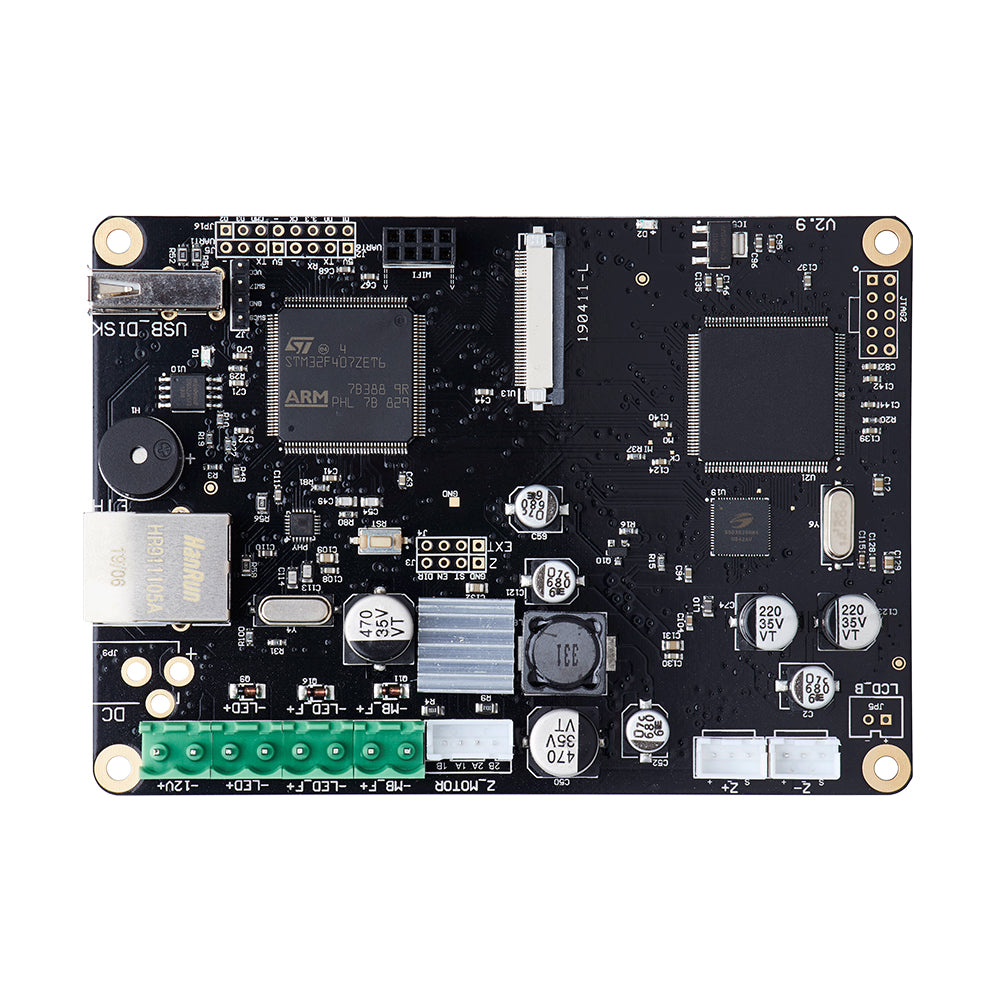
TriGorilla Motherboard for Anycubic Photon
Description
TriGorilla Motherboard for Anycubic Photon is a replacement electronic control board for the classic Anycubic Photon resin 3D printer. The board coordinates the printer main systems, processes commands, controls the LCD exposure screen, Z axis movement, power distribution for individual modules, cooling and communication between electronic components.
During resin printing, the motherboard ensures coordinated operation of the mechanical system, LCD exposure screen, UV LED module, Z axis motor and printer firmware logic. If the board works unstable, the printer may fail to start, freeze, execute commands incorrectly, fail to start exposure, fail to control the platform or show errors during printing.
TriGorilla motherboard replacement may be required after electronics failure, damaged connectors, voltage surge, resin contamination, overheating, short circuit or confirmed board fault after diagnostics. A compatible replacement board helps restore stable Anycubic Photon operation without replacing the whole 3D printer.
Advantages
- Compatible with the classic Anycubic Photon
- TriGorilla motherboard control board
- Used for resin 3D printer electronics repair
- Helps restore printer startup and stable operation
- Controls the main electronic and mechanical modules
- Suitable for replacing a faulty board
- Helps solve control errors and unstable device operation
- Important spare part for Anycubic Photon service maintenance
Technical Specifications
| Product name | TriGorilla Motherboard for Anycubic Photon |
| Full product name | TriGorilla Motherboard for Photon |
| SKU | Not listed in the product card |
| Part type | Motherboard control board |
| Compatibility | Anycubic Photon |
| Purpose | Control of printer electronic and mechanical systems |
| Application | Repair and service maintenance of a resin 3D printer |
| Printer type | LCD resin 3D printer |
| Category | Motherboards for Anycubic resin 3D printers |
When to Replace the Motherboard
- The printer does not turn on or does not complete startup
- The printer freezes during operation
- Z axis control does not work
- The LCD exposure screen does not receive correct commands
- The UV LED module does not start exposure
- The printer does not respond to menu commands
- Control errors appear during printing
- Board connectors are damaged or oxidized
- Resin or liquid has reached the board
- The printer became unstable after a voltage surge
- Diagnostics confirm a motherboard fault
Compatibility
This TriGorilla motherboard is intended for the classic Anycubic Photon. Before ordering, check the printer model, old board, connector layout, ribbon cables and revision compatibility. Anycubic Photon S, Photon Zero, Photon Mono, Photon Mono 4K, Photon Mono 2, Photon D2 and other models use different motherboards.
Important Difference
This product is the motherboard control board for Anycubic Photon. It is not an LCD screen, not a touch display, not a power supply, not a UV LED module, not a Z axis motor, not a resin vat, not FEP film and not a build plate. Before ordering, check the printer model and the old board appearance.
Installation Recommendations
- Turn off the printer completely before replacement
- Disconnect the power cable from the mains
- Remove the resin vat and build platform
- Clean the working area from resin residue
- Take photos of all connections before removing the old board
- Do not pull ribbon cables and wires with force
- Do not touch contacts with wet or contaminated hands
- Check that all connectors are connected correctly after installation
- Before the first print, perform a power on test
- Check the LCD exposure screen, UV module and Z axis movement
- If you do not have electronics repair experience, contact a qualified technician
Usage Recommendations
- Do not allow resin to get on electronic components
- Use the printer in a dry and clean room
- Do not connect or disconnect cables while power is on
- Protect the printer from voltage surges
- Check cables and ribbon cables when errors appear
- Do not use a damaged power supply
- After repair, check all main printer functions
Suitable Applications
- Repair of Anycubic Photon
- Replacement of a faulty motherboard
- Restoring printer control
- Solving startup problems
- Solving Z axis movement errors
- Restoring correct LCD exposure screen operation
- Restoring correct UV LED module operation
- Service maintenance of a resin 3D printer
FAQ
Is this motherboard compatible with Anycubic Photon
Yes, this TriGorilla motherboard is intended for the classic Anycubic Photon.
What is the SKU of TriGorilla Motherboard for Photon
The SKU is not listed in the product card. Before ordering, check the old board appearance and printer model.
What is the TriGorilla motherboard used for
The motherboard controls the printer main systems, including electronics, Z axis movement, LCD exposure screen, UV module and print command execution.
Is this an LCD screen
No, this is not an LCD screen. It is the printer electronic control board.
Is this the touch control display
No, the touch display is a different part. The motherboard is installed inside the printer and controls its operation.
Is this a power supply
No, this is not a power supply. The power supply provides electricity, while the motherboard controls printer operation.
Is this a UV LED module
No, this is not a UV LED module. The UV module provides the light source, while the motherboard controls the printer electronic processes.
When should the motherboard be replaced
The motherboard should be replaced if the printer does not start, freezes, does not control the Z axis, does not perform exposure, shows control errors or diagnostics confirm a board fault.